Kanban board with a built-in method
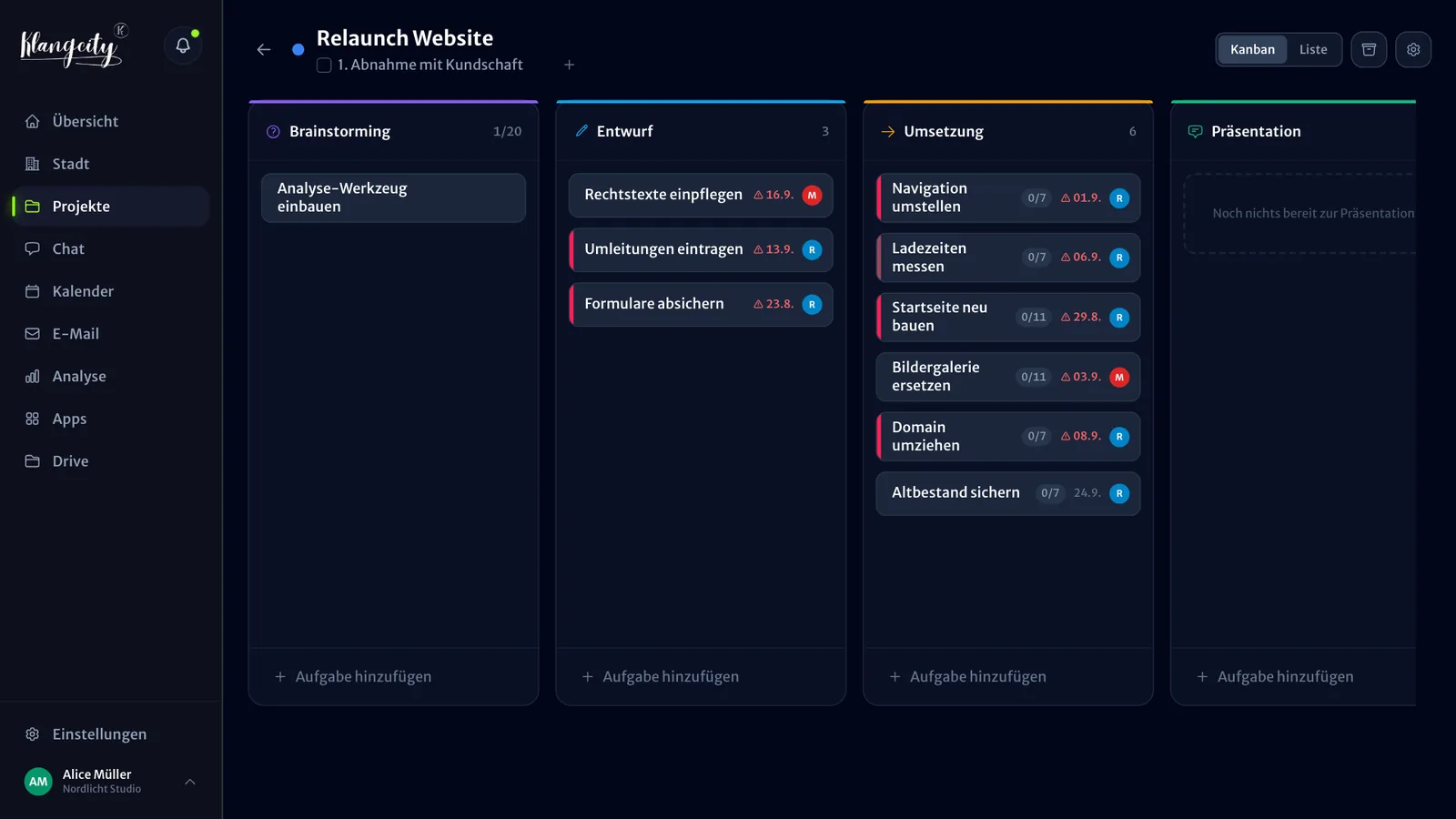
An empty Kanban board is set up in no time. The hard part is getting everyone to use it the same way: which column means what, when is something “done”, who takes care of it? That is why the KlangCity Kanban board comes with a method: five fixed phases, questions for each phase and clear responsibility. And because the servers are in Germany, it is also a Kanban tool for teams that have to keep an eye on the GDPR.
Five fixed phases instead of home-made columns
Every task goes through the same five phases:
- Brainstorming: the idea is there, but not worked out yet.
- Draft: a first plan or proposal takes shape.
- Implementation: now the work gets done.
- Presentation: the result is shown and accepted.
- Done: finished.
The phases are fixed. That sounds like less freedom, but it has an advantage: everyone in the team reads the board the same way, and every project looks comparable. Nobody has to work out first what the column “Under review 2” means in another team.
Reflection questions for each phase
Each phase comes with reflection questions that are answered right in the task. So a task has not just a title, but also what has already been settled. If important answer fields in the current phase stay empty, KlangCity reports this as the signal “Task still incomplete”. Others in the team then know that information is still missing.
Clear responsibility and blockers
- Mandatory assignment: every task gets an assignee. So it is always clear whose turn it is.
- Taking tasks instead of handing them out: if you have time, you take a task yourself. Whether that is allowed in your organisation is up to you.
- Blocking logic: if a task is waiting for another one, this becomes visible instead of quietly stalling.
- Milestone bar: you mark important tasks as milestones. They appear in the milestone bar, and in the city they become stops of the project tram.
How strict these rules are depends on your organisation. When you set it up, you answer a short questionnaire about how you make decisions. KlangCity then adjusts, for example, whether members may take on tasks without being assigned, who can mark a task as “urgent” and whether a task needs approval before implementation. Every rule can still be changed on its own.
Checklists, recurring tasks, shareable links
In everyday work, the small things count:
- Checklists with @mentions: tick off steps and mention colleagues right at a specific point.
- Recurring tasks: whatever comes up every week or every month, you set up once.
- Shareable task links: share a task as a link in chat or in an email.
- Automatic archive: KlangCity moves completed tasks to the archive after seven days. The board stays clear, and nothing gets lost.
- Priorities: urgent, high, medium or low.
Tasks don’t only start on the board. One tap turns any chat message into a task, and whatever is created or changed in a meeting appears afterwards in the meeting minutes.
Example organisation, no sign-up. Works on your phone too.
The board is the foundation of the city
Every card on the board is a building in the 3D city. The construction stage of the building follows the phase of the task, and completed tasks stand as finished buildings. From the same data, KlangCity calculates 35 signals, for example whether a person is overloaded or a project is getting into trouble. So you only keep the board up to date, and the city shows you where work is piling up.
If you have been working with another board for a while, you will find an honest comparison on the page KlangCity as a Trello alternative (German).
A Kanban tool that fits the GDPR
Tasks often contain names, customer data and internal agreements. That is why:
- Servers in Germany: the app runs at Hostinger, files and backups are stored at Hetzner.
- Data processing agreement included: it lists every service that processes data outside the EU. That includes the AI features, for which text goes to Anthropic.
- Accounts protected: two-factor login, mandatory for everyone if you wish, and a list of login attempts from the last 90 days.
- Retention periods and data export: for each person and for the whole organisation.
- Guest access: outside people such as a board of trustees only read along and change nothing. Guests see all projects and tasks of your organisation, plus the overview, the city and the calendar. They don’t see file storage, chat, emails, meeting minutes, the weekly report or signals about people. Guests don’t count as people in your plan.
What does the Kanban board cost?
The board is included in every plan. With Basic, KlangCity is free for good for up to 5 people, with board, city, chat and meetings. Every new organisation can try Pro free for 30 days first, with no card and no subscription. If you need more people or storage, you move to Pro or Business, and we tell you the price for your country on request. All details are on the pricing page.
Example organisation, no sign-up. Works on your phone too.
Frequently asked questions
Can I create my own columns on the Kanban board?
The five phases Brainstorming, Draft, Implementation, Presentation and Done are fixed. That way everyone reads the board the same way, and the city can show each phase as a construction stage.
Does the Kanban tool fit the GDPR?
The servers are in Germany, a data processing agreement is included, and there is two-factor login, retention periods and data export. For the AI features, text goes to Anthropic; this is set out in the data processing agreement.
Are there recurring tasks and checklists?
Yes. You set up recurring tasks once, and every task has checklists, with @mentions of individual people.
What happens to completed tasks?
They become finished buildings in the city. After seven days, KlangCity moves them to the archive automatically, so the board and the city stay current.
Is the Kanban board free?
Yes, for up to 5 people with the Basic plan, for good. Larger teams use Pro, with 10 people included; the price for your country is available on request.