Project management demo without sign-up
You want to see it before you sign up? Good. The KlangCity project management demo runs right in your browser, without sign-up and without an email address. You land in the city of a made-up company on a Monday morning and see within a few minutes what KlangCity reveals about a team.
Who is “Nordlicht Studio”?
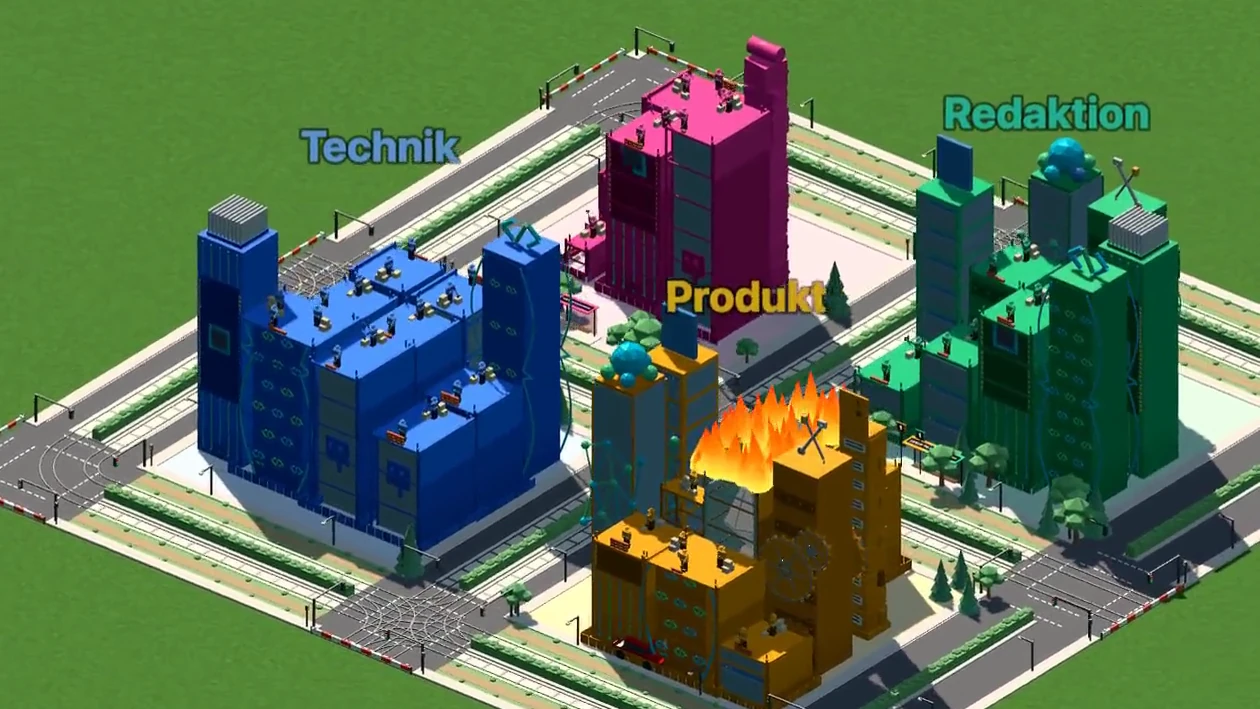
Nordlicht Studio is a made-up company. It is Monday, 9:00. Nine people work in four groups: Product, Engineering, Design and Editorial. They have five projects, for example the website relaunch, season 3 of their podcast and a trade fair in Hanover.
The city is built from perfectly ordinary tasks: who is working on what, how urgent it is, by when. KlangCity calculates the signals in it exactly as in any real city, with the same rules and the same numbers. None of it is set by hand. And because all dates are set relative to today, the demo doesn’t age: three months from now, the same house will still be on fire.
What you see at the top: the overview
Once the city is built, a line appears at the top: “Monday, 9:00 · Nordlicht Studio”. Below it you see what is going on right now, for example how many people are overloaded, which project is in trouble, how many tasks are overdue or on ice and who still has room. These numbers are counted from the data, not typed in. One tap on a tile takes you straight to the right spot in the city.
The guided tour: stop by stop
You have two options: start the guided tour or look around on your own. The tour flies you to the places where something is going on. The order is deliberate: the urgent things first, the positive one last.
- House on fire: a house is on fire. In the last 14 days, one person has received nothing but urgent or high-priority tasks.
- Overloaded: thick smoke above a house. This person’s open workload is more than three times the average.
- Expertise group overloaded: pickets in the district of a whole group.
- Project in trouble: the project tram is on fire and passengers are jumping off. More than half of the open tasks are overdue.
- Task overdue: a building sinks into the ground because it is more than a week past its date.
- Task on ice: icicles on a building nobody has moved for more than a month.
- Free capacity: a party with a disco ball outside the house of a person who has room right now.
- Full momentum: to finish, fireworks at night above a project where a lot is getting done right now.
At every stop, Klangi, the cat who guides you through KlangCity, explains three things: what you see, why it happens, with the actual numbers and what would help. For example: “In the last 14 days: 4 tasks, all urgent.” That turns a nice picture into a statement a team can actually work with.
Example organisation, no sign-up. Works on your phone too.
Look around on your own
After the tour, or right from the start, you can move around freely. Click on a building, and Klangi explains what exactly is going on at this house: which task it is, who is working on it, which project it belongs to and which signals are visible here. If nothing is going on at a house, Klangi tells you that too.
What each picture means is explained in detail on the page The 3D city and its signals.
What the demo honestly doesn’t show
The demo city is packed with events so that you see a lot in a few minutes. A real city needs a little time for that: many signals look at the last 14 or 30 days. So your own city shows this kind of thing after about two weeks of real work. You don’t need a mood survey for the signals, just your normal tasks.
The demo mainly shows the city. You get to know the Kanban board, chat and calls and the automatic meeting minutes after you sign up. There, a tour in 19 chapters guides you through the app.
Does the demo run on my device?
The demo runs in the browser, on a computer and on a phone too. The 3D city needs a bit of graphics power. If the browser runs short of memory, KlangCity rebuilds the city with less graphics. If it still doesn’t work on a very old phone, the demo usually runs without problems on a computer.
And then?
If you like what you see, you can get started straight away. For the first 30 days, your organisation tries Pro for free, with no card and no subscription. After that, Basic is free for good for up to 5 people. When you set up your organisation, KlangCity asks 14 short questions about how you make decisions. You can also fill in the questionnaire beforehand, without an account. All plans are on the pricing page.
Open the demo city · Sign up for free
Frequently asked questions
Do I need an account for the demo?
No. The demo city runs right in your browser, without sign-up and without an email address.
Is this real company data?
No. Nordlicht Studio is a made-up company. But KlangCity calculates the signals using the same rules as in any real city.
How long does the tour take?
The tour has up to eight stops and takes a few minutes. You can end it at any time and look around on your own.
Does the demo work on a phone?
Yes, in the browser. If memory runs short, KlangCity rebuilds the city with less graphics.
Will my own city look like this straight away?
No. Many signals need a history. After about two weeks of real work, your city shows where things are on fire in your organisation.